Tagging products
What is a product tag?
Product tags link a short to a product from your store, so shoppers can jump straight to the product page. On Shopify, tags connect to your Shopify products.
You tag products while uploading content in the ShortsWorks app. For content you've already uploaded, open the ⋮ (More) menu on the short and choose Edit to reopen the editor.
- In the editor, tap the tag icon in the right-hand toolbar.
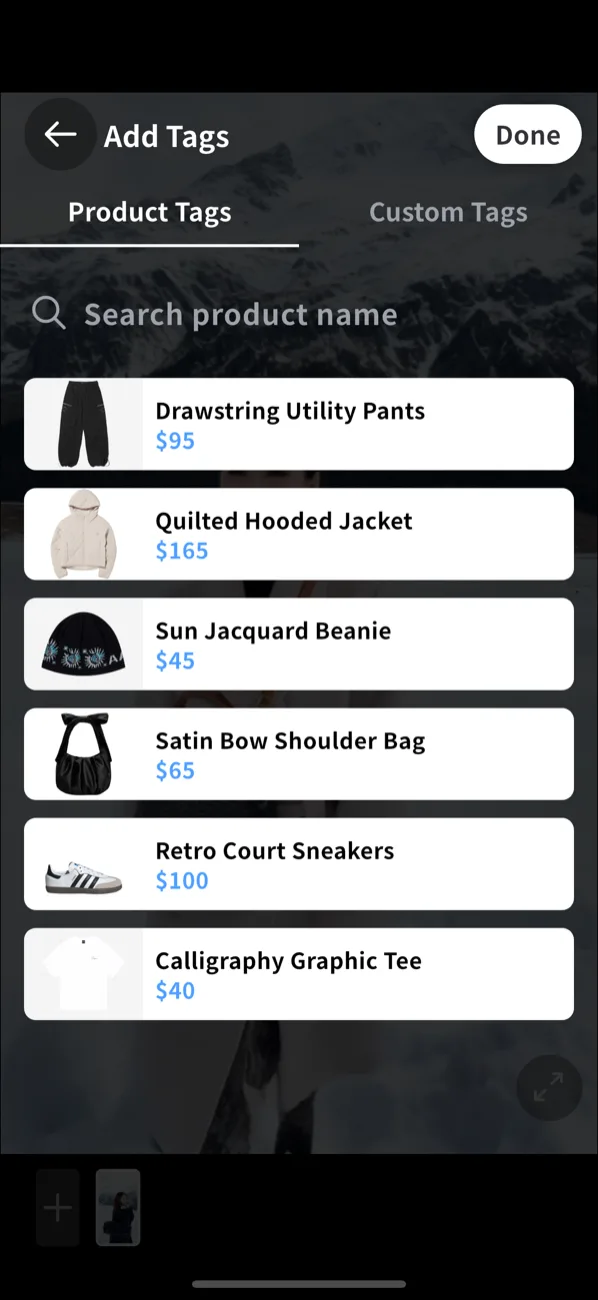
- The Add Tags screen opens, with Product Tags and Custom Tags tabs.
- Search your Shopify catalog by product name, or scroll the list.
- Tap a product to add it as a tag — the price comes from your store.
- Tap Done to return to the editor.
Product tags also appear on the storefront widget — turn them on or off, and set their theme, in Widget Studio or the floating widget / block settings.